
Building a Full-Featured AI Agent
· Tech · AI Agent / LangGraph / MCP / RAG / Multi-Agent / Background Tasks
Ongoing · Continuously improving
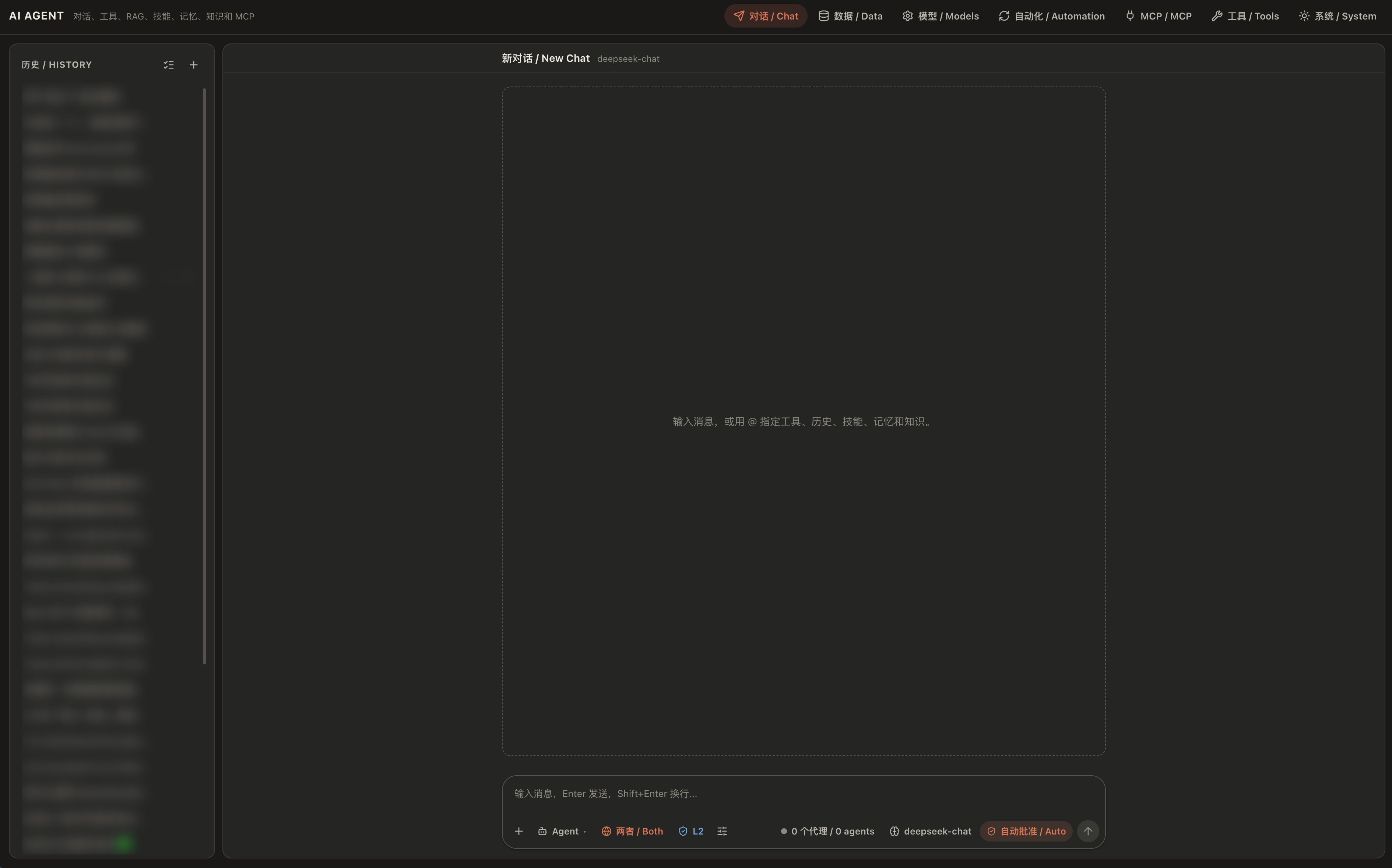
I previously built a rental-agency AI Agent with AI assistance. Recently, I refactored part of the code and added features such as standard MCP support.
I ran into many interesting problems while building the AI Agent, so I wanted to write them down.
Rental-system introduction / AI Agent GitHub
About the State Loop
I use LangGraph for the main state-transition work, letting the model move between states such as starting a conversation, ending a task, and calling tools.
In the past, to consider many different situations, I created far too many states. I even had a third-party LLM checker. For example, if a tool needed to be called but the model ended the conversation without calling it, the third-party model would block the stop and tell the model to call the tool. In reality, the effect was very bad, and it was also one reason my early model kept failing.
Now I have simplified the states. Roughly speaking, they are divided into these cases:
- First start of the conversation: inject the system prompt and related content -> 2
- Conversation begins: inject the user question and possible RAG returns -> 3
- Model replies. If it confirms that it can stop -> 4. If it needs to call a tool, it calls the tool while replying. If the call is correct -> 3. If the call is wrong -> 5
- Stop
- Tool-call error: return the concrete tool-calling method and the original error text
- Compress the context outside the system prompt. This can be triggered manually or when the context becomes too long
About AI Agent Conversations
I ran into many problems while building AI Agents before. In short, the simpler an AI Agent is, the more effective it tends to be.
Previously, I tried to solve many context-related problems. For example, I tried asking the AI to summarize the previous conversation at the end of every turn, then only pass the summarized history to the model in later conversations instead of every concrete dialogue message.
But this did not actually save tokens for the AI Agent. In practice, LLM context windows are already long enough, and summarizing every time made it harder for the AI to understand the context, which reduced work quality.
I also once tried to tell the AI, in detail at every conversation, the rough function and calling method of each tool. I found that this instead made the AI confused by the context and made the model keep making mistakes.
Now I only compress the whole context when it is needed, such as when the text is too long. Otherwise, I directly give the LLM all historical content. The LLM's KV cache can instead save tokens very well, and the continuity and accuracy of the task improved.
Because of how KV cache works, cache is usually usable only when the previous context is exactly the same. So I only give a short system prompt at the beginning of the model context, then provide only the available tool names later. When compressing context, I avoid compressing the system-prompt section, which makes good use of KV cache.
About Tool Calls
Tool calls require many safety checks, so I will not expand on that here.
When I built AI Agents before, I only forced the model to reply in JSON format and repeatedly told it detailed tool-call steps. In practice, the AI's engineering ability was extremely poor.
Now I have found that LLMs have a dedicated JSON output position for tool calls, and we can directly use the rules already designed for the LLM. Simply put, at the beginning of the whole conversation, I only need to mention simple tool names, their inputs and outputs, and a concise one-sentence description. The AI can then complete tasks well.
I usually divide tools into three categories. Basic capabilities such as RAG and web search are usually configured as manual switches, so the model can automatically obtain related content when the user enters a request, instead of doing multi-turn tool calls.
The second category is common tools, such as manually querying RAG or reading and writing files. These tool calls are written directly into the opening instruction, with concise tool descriptions and call methods. Only when the model calls them and fails do I provide concrete details and the original error message, so the AI Agent can debug itself well.
The third category is uncommon tools. I usually only write these into skills, so when the model encounters a similar problem, it can manually or automatically read the related knowledge through RAG or manual search.
About Multi-Agent Work
Sometimes multiple Agents can finish work faster than a single Agent, but parallel execution also introduces the risk of conflicting modifications.
My design follows this loop:
- The main process designs the task and starts sub-agents with task-specific prompts -> 2
- The sub-agents work in parallel. The backend records which child processes are running and sends their results back to the main Agent when they finish -> 3
- The main Agent reviews the work and can also inspect progress while it is running. It can request changes, accept the result, or stop the work -> 2 or 4
- The main Agent summarizes the completed work and returns the result
For read-and-write conflicts, I tested several approaches. The simplest reliable method was to let every sub-agent prepare its file changes in temporary files, then have a single process apply those changes to the shared files. Serializing the final writes strictly avoids simultaneous write conflicts. If a target file changed while an Agent was preparing its edit, the latest version is sent back to the Agent so it can revise the change.
About Background Tasks
I often run model training on servers. A classic problem is that an Agent may start a simple task, but disconnecting from the server can cause its progress to be lost. Long-running training therefore needs to continue in the background, while some tasks still require monitoring or a manual wake-up to report progress and decide the next step.
My solution is:
- Every background task must record the background program it starts
- A background program can be configured either to stop when the conversation closes or to keep running
- A simple command can wake the conversation associated with a background task
This solves a common problem when working with Codex: repeatedly keeping a conversation alive or reopening it just to check experiment progress and start the next step. The Agent can instead continue automatically when an experiment finishes, without spending tokens on repeated polling.
About RAG
I once tried to improve RAG search accuracy with a better encoder, but it was too slow once deployed on a server. After studying and reading more, I switched to a hybrid of keyword search (BM25) and vector search:
- Split documents into chunks by text structure, or let a smarter LLM plan the split.
- Let an LLM write a short piece of context for each chunk, so a single chunk does not lose its surrounding meaning in the search results. This is done when the index is built, so no model is needed while searching.
- At search time, use keyword search and vector search together, then rank the combined results.
In addition, if an answer cites RAG content, the code checks that the cited sources are real, and sends the answer back to the model to be rewritten if the check fails.
In a small number of tests, this approach improved search accuracy without adding cost at search time.
About Memory
I have reworked the memory design several times. At first, the model wrote all memories into a single file and searched it with RAG when needed. But this caused many problems: memories differ in how reliable they are, and some of them become outdated. Now I use a more structured approach.
Memories fall into three types:
- Long-term user memory: the user's background, occupation, and so on.
- Short-term user memory: things tied to a specific time, such as a meeting on Friday.
- Experience: how to avoid errors in a task, and similar lessons.
Each memory has roughly these attributes (adjusted as needed):
- Time attributes: the event time, the expiry time, and so on. These are relatively objective and are mostly created by the model.
- Content attributes: the memory itself, the insight the LLM adds from context, and importance and confidence scores. These are more subjective. For example, "the user likes fries", and the AI notices the user probably only likes one particular restaurant's fries.
- Source attributes: the memory ID, creation time, and source (the user's own words, an AI summary, or something produced during later tidying). These are fully objective.
Once enough memories have accumulated, the backend tidies them automatically: it marks outdated memories, merges duplicates, and generates new insights from several memories. Nothing is deleted directly, only its status changes.
Search still uses RAG, but only over valid memories, and information such as type, importance, and confidence takes part in retrieval. This structured tidying relatively improves the accuracy of memory use.
About MCP
Simply put, MCP is similar to a model-specific API. The backend can directly handle API communication, and the model can call MCP features directly just like tools.
About Automation
It seems that many AI Agents have automation features that trigger according to a fixed time cycle, but most AI Agents hard-code these schedules, such as weekly, monthly, or daily runs.
In practice, after each trigger, the LLM can automatically decide the next trigger time. This even makes it possible to trigger tasks on a Fibonacci-style interval.
About Changing AI Agent Settings
For safe content, the AI Agent's system settings can be configured through formats such as JSON. Then the AI Agent can automatically update settings by modifying files, such as changing the system language.
About Conversation Modes
The Agent now has three modes: Ask, Plan, and Agent. In Plan mode the model first writes a session plan that I can review, and only after I approve it does the implementation start, which avoids the Agent running off in the wrong direction.
The Agent can also ask me questions in the middle of a task, with free text, choices, refusal, or redirection. The question dialog can be minimized, so it does not block the conversation.
Conversations can be branched and edited, messages can be queued or inserted while the Agent is working, and a running task can be paused and resumed.
About Custom Tools
Reusable Python tools can be created on the Tools page, or by the Agent itself as custom__name. When the Agent finds that it keeps repeating the same operation, it can turn that operation into a tool. This follows the same principle as before: only the tool name and a one-sentence description go into the context.
About Parameter References
Tool results can be very large, such as a long MCP query or a whole file. Putting them all into the context wastes tokens and confuses the model. Now such results can be saved as conversation-scoped parameters and referenced by an ID like param:<id>. The model can pass the reference to the next tool, or read only the path or slice it needs, instead of copying the full data back and forth.
In the interface, a current-operation preview shows what the Agent is doing and which tools it is calling, so I do not have to wait in the dark.
About Deployment
The Agent is now deployed independently with Docker and GitHub Actions, decoupled from the rental system repository. The containers publish no host port. They join an internal Docker network, and the rental system's gateway is the only public entry, proxying the Agent after its login check.
About Permissions and Approval
I never give the Agent full access, because that is too dangerous. I currently use three permission levels and several approval modes.
Permission levels
- L1: conversation, plus read-only operations such as RAG and web search (individual features can be turned off manually). No code runs and no files can be modified.
- L2 (default): all tools are available, including MCP and file reading and writing, but anything that runs code is handed to an unprivileged system user, and changes to sensitive files and configuration are restricted. There are no real system privileges.
- L3: the full privileges of the backend itself. Since I mainly deploy in Docker, having root inside the container is relatively acceptable. If it is deployed directly on a machine, though, it could in theory do anything.
Note that without an OS-level sandbox, this mechanism only reduces risk and cannot guarantee absolute safety.
Approval modes
- Manual approval: pause first and show me the exact content, and execute only after I approve.
- Auto approval: almost everything runs directly.
- AI review: a side-channel LLM judges whether to allow an action based on the user's request and the actual operation, mainly for high-risk actions.
- Deny all: read-only, no changes allowed.
An Interesting Thing
During development, the best helper is directly asking Codex, which helps me code, how it performs different operations, then imitating and learning from it.
I can also let an LLM directly test the Agent's features and report errors, which makes problems easier to find and fix.